My Sets #
To view your sets, you can select “My Account” in the top right corner and then click on My Registry sets from the drop-down menu. If you’re on the CAC Registry Home, you can click the “0 Sets” with My Sets labeled underneath to be directed to the same page.

From the “My Sets” page, you can filter and view your sets just like you can with the “My Collection” page. To sort, click the up and down arrows next to the column headers (i.e Set Type, Score, Rank, % Complete, etc.). Filter by date, denomination, mintmark, etc. for easy searching.

My Want List #
The Want List can be found by clicking “My Account” and selecting “My Want List” from the drop-down menu. It’s also displayed to the left side of the CAC Registry home next to “My Sets.”
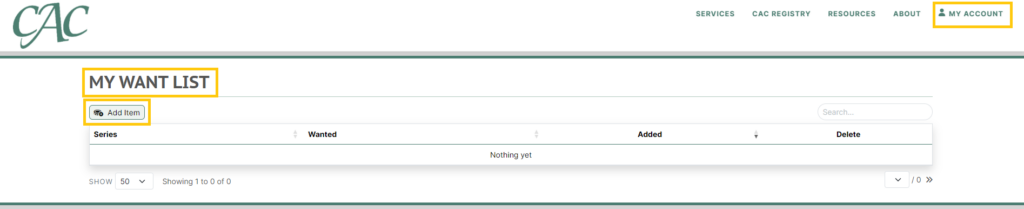
To add to your want list, click on the “Add Item” button for the above “Item Details” pop-up box to appear. This is where you can search for any coin you would like to add to your collection or sets. For each item, you can write notes as to why you may want the coin. Some notes for example, “to finish a set or series, to gift, etc.”
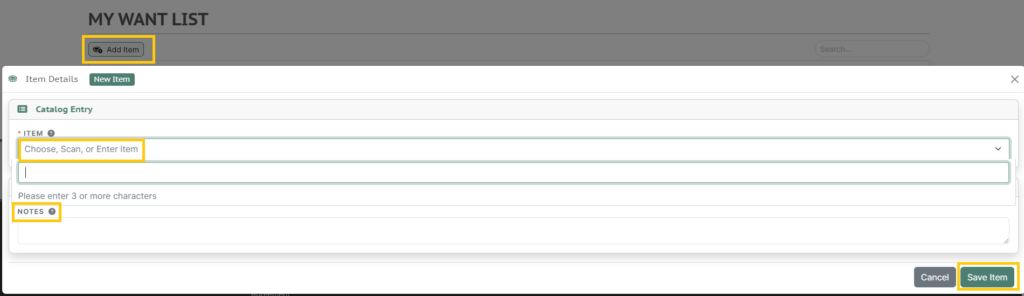
The notes for your coins will not appear on the list, but you may click on the row of the desired coin to display or edit the notes. You can sort by series, coin wanted, and date added to “My Want List.” As of now, the only way to remove the item from the Want List is to delete it by clicking the trash can icon under the “Delete” column. Adding a coin from the want list to your collection will not remove the coin from your want list for you. If you have more than 50 coins on your want list, be sure to show more than 50 or navigate to the next page to view all!